
Use connections and the playground
Read connection metrics, try an API request, handle queued results and disconnect access safely.
2 min readView a connection#
Select your project, open Connections and choose View beside a company. The tabs are Overview, Playground, Webhooks and Webhook activity.
Overview shows the last 24 hours of operation counts, failures, in-progress work and average completion time, plus the current session uptime. The charts show Sage operations and connector check-ins. Session uptime is not a historical availability percentage or an SLA.
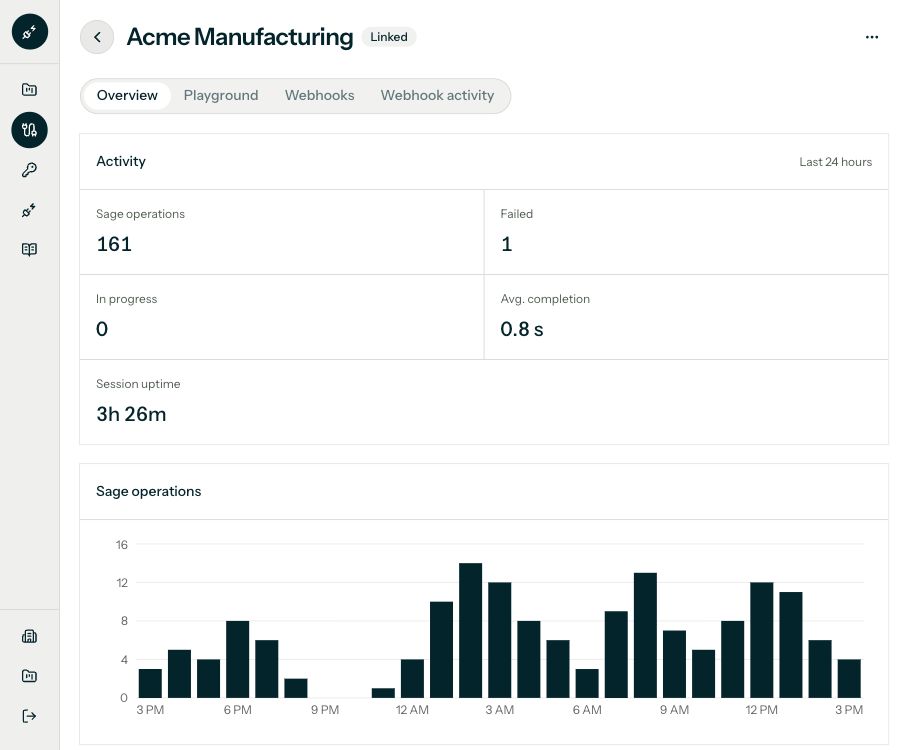
Further down, Details contains the Sage product, project, connection ID and approved operations. Check Last seen when investigating an offline connector. A Linked badge describes the grant, not live connectivity.
Run a read in the playground#
- Open Playground.
- Choose
GET /infofrom Endpoint to inspect the connected edition, version and available resource operations. - For records, choose an endpoint such as
GET /customers. Set Limit and Offset where shown. - Select Run. The button stays in a loading state while waiting for Sage.
- Read the HTTP status and JSON response. Use Copy to copy the response if needed.
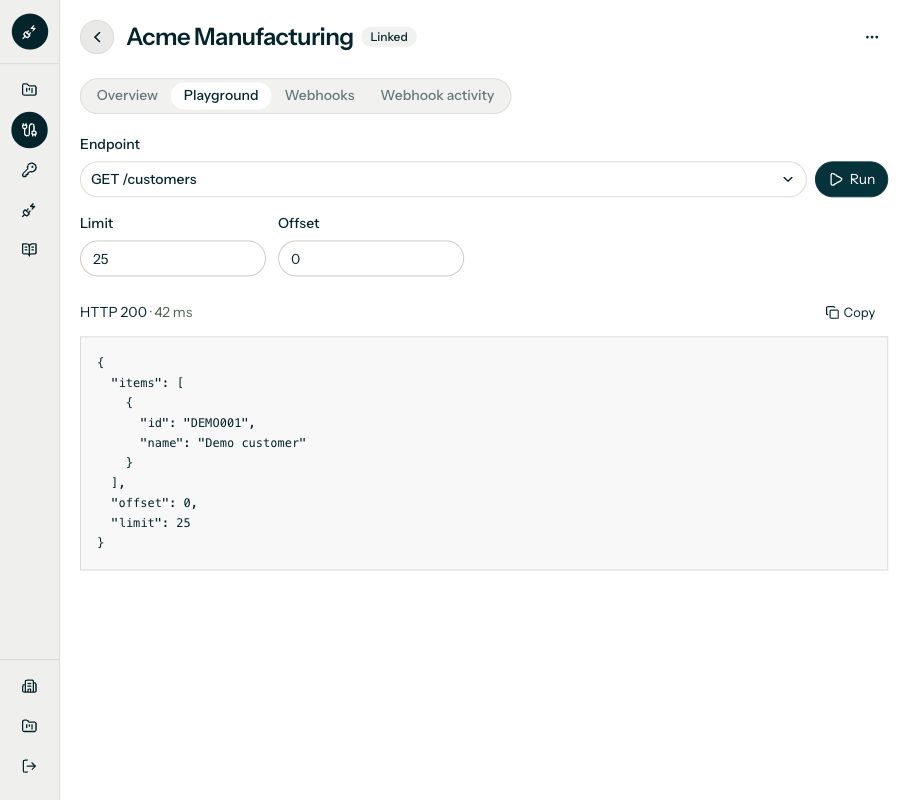
The live playground sends real requests to the selected company. Use a disposable company for write tests. POST, PATCH and DELETE requests require confirmation, and permissions still apply even when an endpoint appears in the selector.
Call from your backend#
Use the production base URL https://sage-connector-public-api.nameless-union-7a77.workers.dev and a project API key. Set this base URL explicitly in your API client when importing the OpenAPI document.
curl --include --header "Authorization: Bearer <API_KEY>" "https://sage-connector-public-api.nameless-union-7a77.workers.dev/v2/connections/<CONNECTION_ID>/info"Replace the placeholders locally and keep the key out of shared logs. For list requests, the default page size is 25 and the maximum is 100. Follow nextOffset when the response provides it.
Handle queued results#
Execution requests default to completionMode=wait, waiting up to 15 seconds. Use completionMode=immediate for an immediate response. Pending work returns 202 and continues within the operation's deadline; 202 does not mean it succeeded.
Poll the returned statusUrl or Location with the same API key, honoring Retry-After. Check the terminal operation state and result.success, then read result.payload or result.error.
Writes require an Idempotency-Key. Reuse the same key and body when retrying the same request. If a dispatched write returns OUTCOME_UNKNOWN, read and reconcile the Sage result before another write. See throughput and limits for measured capacity, queue bounds and deadlines.
Disconnect access#
Open the three-dot Connection settings menu beside the connection title, then choose Disconnect. Type remove in the confirmation modal and confirm. Reconnecting needs a new setup code. This revokes the app's grant; it does not delete the Sage company.