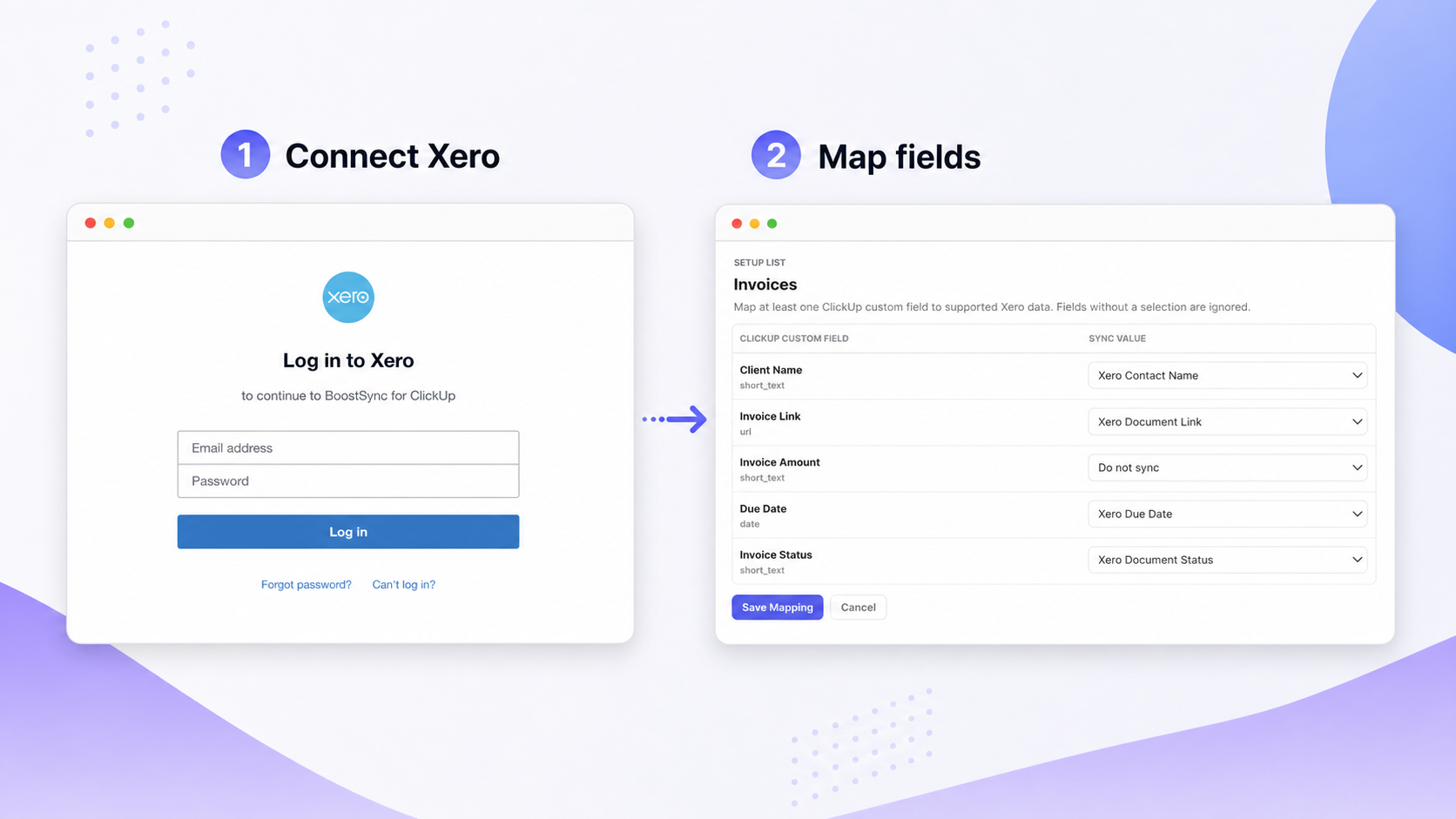
ClickUp is great for tracking deals, jobs, and client work. Xero is where your quotes live. The problem is that moving between the two wastes time and loses context. BoostSync for Xero lets yousend a Xero quote from ClickUp directly from a task, with real contacts and products pulled from your Xero account. No switching tabs, no copying data.
Why Teams Use ClickUp to Manage Projects and Client Work
ClickUp is flexible, affordable, and built for teams that need to stay organized without a lot of technical overhead. You can set up Spaces, Lists, and Tasks to match almost any workflow, whether that is a sales pipeline, a project delivery board, a client request queue, or internal operations.
Teams use ClickUp to assign work, track due dates, leave comments, log time, and run automations that keep things moving. A task can represent a lead, a contract job, a client onboarding, or a recurring service. Everything about that piece of work lives in one place.
The Problem: Xero Quoting Lives Outside ClickUp
ClickUp does not handle Xero quoting natively. When a deal or job reaches the point where the client needs a quote, someone has to leave ClickUp, open Xero, find or create the contact, build the quote from scratch, and then copy the details back into the ClickUp task manually.
That creates extra admin work every single time. It also creates a loose link between the task where the work is being managed and the quote where the commercial details live. If the quote gets updated in Xero, someone has to remember to update ClickUp too. For sales teams, project managers, and operations teams that quote regularly, this back-and-forth adds up fast.
Why Zapier Falls Short for Quote Workflows
Many teams try to bridge the gap with Zapier or similar automation tools. For simple triggers, these can work. But quote workflows are more complex than a basic two-step automation.
Zapier setups for quoting tend to be flimsy because they require manual configuration for each field, break when contact or product data changes, and do not give users a clean way to select the right Xero contact and products from inside ClickUp. You end up with a workaround that still requires someone to go into Xero to finish the job. A purpose-built integration like BoostSync for Xero handles the whole workflow without the fragile middle layer.
The Solution: BoostSync for Xero
BoostSync for Xero is an app that sits inside your ClickUp workspace and connects directly to your Xero account. Once set up, your team can create and send Xero quotes from any connected ClickUp task without ever leaving ClickUp.
The app pulls your real Xero contacts and products into dropdowns inside ClickUp, so users are working with accurate data rather than typing details in manually. When a quote is created or updated in Xero, the relevant details sync back into the ClickUp task automatically. It handles the detail that generic automation tools miss: line items, tax rates, multiple Xero organizations, and bi-directional status updates.
How to Send a Xero Quote from ClickUp
Here is the full step-by-step process:
Go to the BoostSync portal and log in with your ClickUp account.
Authorize your ClickUp team or workspace.
Authorize your Xero organization. You can connect more than one Xero organization if needed.
Select Quote from the Xero document type dropdown.
Choose the Xero contact from the dropdown of real contacts in your connected Xero organization.
Add products or line items from your connected Xero products list.
Create or send the quote through Xero.
BoostSync syncs the quote details back into the ClickUp task automatically.
What Else You Can Create Besides Quotes
The same workflow supports invoices, bills, and purchase orders. Switch the document type in the dropdown on step 7, and the rest of the process is identical. If you want to go deeper on how purchase orders work inside Xero, theXero purchase order management guide covers best practices for controlling spend and tracking approvals.
Teams that already handleXero invoice tracking in ClickUp use the same connected List for both quotes and invoices, keeping the full billing cycle inside one workspace.
Manage Quoting from Where the Work Already Lives
The biggest benefit of this setup is that quoting stays inside the task. If a ClickUp task represents a lead, a job, a client request, or a project, the quote gets created and tracked right there alongside everything else related to that piece of work.
Your team does not have to copy quote links into task comments, jump between tools mid-conversation, or rely on someone remembering to update ClickUp after sending a quote from Xero. The connection is automatic, and the task stays current.
Stop Copying Data Between Tools
Manual data entry between ClickUp and Xero is where mistakes happen. A contact name typed slightly differently, a quote amount that does not match the task, a status that never got updated. According toXero's guidance on quoting, clients can accept a quote with a single click once it arrives by email. The faster a quote goes out with accurate details, the better the chance it gets accepted.
BoostSync removes the manual step entirely. The data that exists in ClickUp maps directly into the Xero quote. No retyping, no checking two places, no version mismatch between the task and the accounting record.
Keep Finance in Xero, Give Your Team Visibility in ClickUp
Finance teams want Xero to stay the source of truth for accounting records. That is exactly how BoostSync works. Quotes are created and stored in Xero. BoostSync surfaces the relevant details inside ClickUp, so the broader team has visibility without needing Xero access.
A project manager can see whether a quote has been sent and accepted from their ClickUp task. A salesperson can track quote status without logging into the accounting platform. Finance stays in control of the official records while everyone else gets the visibility they need to keep work moving.
A More Controlled Way to Handle Xero Access
Most businesses do not want every team member working directly inside their accounting platform. Giving a salesperson or project manager full Xero access creates unnecessary risk. They might edit a contact, delete a record, or see financial data that has nothing to do with their role.
BoostSync gives teams a more controlled alternative. Users create and track quotes from ClickUp without needing a Xero login. Finance keeps full control of the Xero account while the rest of the team gets exactly the access they need, nothing more. Teams using monday.com instead of ClickUp get the same controlled access model throughBoostSync for Xero on monday.com.
Who BoostSync for Xero Is Built For
BoostSync for Xero is built for small and mid-sized businesses that already use ClickUp to manage work and Xero to manage accounting. It is particularly useful for:
Sales teams that track deals in ClickUp and need to quote from the same task
Project managers who handle client work end-to-end and want quoting to stay inside their workflow
Operations teams managing jobs or contracts where a quote kicks off the work
Finance teams that want the broader team to have quote visibility without handing out Xero logins
If any of those describe your team, BoostSync for Xero is likely the fastest way to close the gap between your project management and your accounting.
What Happens After the Quote Is Sent
Once the quote goes out through Xero, the status syncs back into the ClickUp task automatically. Your team can see whether the quote is sent, accepted, or declined without opening Xero.
When a client accepts, the task updates in ClickUp and your team can move straight into delivery.
Send Your First Xero Quote from ClickUp Today
If your team already lives in ClickUp, there is no good reason to keep jumping into Xero every time a client needs a quote. BoostSync for Xero connects the two, so quoting becomes part of the task, not an interruption to it.
The setup takes under 15 minutes, it is free to use right now, and it saves your team the back-and-forth that slows down every deal. Install BoostSync for Xero and send your first Xero quote from ClickUp today.
FAQs About How to Send Xero Quote from ClickUp
Can I send a Xero quote from ClickUp?
Yes. BoostSync for Xero lets you create and send Xero quotes from any connected ClickUp task.
How much does it cost?
BoostSync for Xero is free to use for all users right now. Pro features may be offered as a paid upgrade in the future.
Does it sync quote data back to ClickUp?
Yes. Quote details are mapped into ClickUp custom fields and kept up to date automatically.
Can I use my actual Xero contacts and products?
Yes. When creating a quote, you select from real contacts and products pulled directly from your connected Xero organization.
Yes. BoostSync also supports invoices, bills, and purchase orders using the same workflow.
FAQs About BoostPlugins
What does BoostPlugins do?
Boost Plugins builds lightweight apps that automatically sync data between business tools like Xero, Shopify, and QuickBooks Desktop with monday.com and ClickUp. Connect once, and the data flows; no manual entry or technical setup needed.
How much time does BoostPlugins save?
Customers typically save 15 to 20 hours per week by eliminating manual data entry between their accounting and project management tools.