
If you want to know how to launch a Shopify store, you're in the right place, even if you've never sold anything online before. This guide walks you through every step, from picking your niche to driving your first sale. Finally, every store needs a CRM and Order Management tool. A growing platform for this is monday.com through BoostSync for Shopify. At the end of the article, we will go over how to use monday.com to help manage and automate your store beyond the Shopify basics.
Why Shopify Is the Smart Choice for Your Online Store

Ready to start your Shopify store? You've already made a smart call. According to Chargeflow, Shopify commands roughly 30% of the US eCommerce platform market share, making it the dominant platform for online retail. That dominance is built on ease of use, a massive app ecosystem, and the ability to grow whether you're selling 10 products or 10,000.
Capital One Shopping Research suggests that Shopify generated $5.04 billion in revenue in just the first half of 2025, a 29% year-over-year increase. For beginners, Shopify removes the technical headaches. For experienced sellers, it grows without limits.
What You Need to Know Before You Open a Shopify Store

Most guides skip straight to account creation. That is exactly why so many new stores sit empty three months after launch.
Pick a Niche and Know Your Customer
You don't have to have an existing product to start a store; many new store owners have found success by finding the right niche to sell in.
Start by choosing a niche specific enough to speak to a defined group of buyers. Get clear on your target customer: their age, interests, problems, and where they spend time online. Generic stores struggle to attract loyal customers.
Choose Your Fulfillment Model
- Dropshipping keeps upfront costs low but gives you less control over shipping times and product quality.
- Print-on-demand works well for custom merchandise without warehouse overhead.
- Holding inventory gives you the most control but requires more capital.
Validate Demand Before You Build
Use Google Trends, browse bestseller lists on major retail platforms, and check relevant Reddit communities for what people are already buying and complaining about. If people are already talking about the problem your product solves, that is a strong signal that you are pointed in the right direction.
How to Set Up Your Shopify Store: Account Creation and Store Basics

Setting up your Shopify store starts at shopify.com. Click "Start free trial," enter your email, create a password, and follow the prompts. Once inside, head to Settings and enter your store name, business address, currency, and time zone.
New Shopify stores currently get their first three months for just $1 per month. That gives you plenty of time to build, test, and make your first sales before you commit to a full plan.
|
Plan |
Monthly Cost |
Best For |
|
Basic |
~$39 |
New stores, getting started |
|
Growth |
~$105 |
Growing stores needing reporting |
|
Advanced |
~$399 |
High-volume established stores |
For most people just getting started, Basic is plenty.
Choose a Theme and Customize Your Storefront

Your store's design is the first thing customers judge, and free themes are genuinely solid.
Free Themes Worth Considering
|
Theme |
Best For |
|
Dawn |
Fast, mobile-responsive, general use |
|
Craft |
Artisan and lifestyle brands |
|
Sense |
Wellness and beauty |
|
Debut |
General merchandise |
Paid themes range from $200 to $400, but you do not need one to launch professionally.
How to Customize Your Theme
Go to Online Store, then Themes, and click Customize. Edit colors, fonts, upload your logo, and adjust your layout. Get it to "good enough" and go live. You can refine the look as you learn what your customers respond to.
Add Products and Write Descriptions That Convert

Go to Products in the admin menu and click "Add product." Fill in the title, description, images, pricing, and inventory details. Use at least three to five images per product: a clean hero shot, a detail image, and at least one lifestyle shot showing the product in use. Write descriptive alt text on every image.
For descriptions, lead with benefits, not specs. What problem does this solve? Use plain language and short paragraphs.
Use Collections to group related products and set up your navigation menu so customers can reach what they want in two clicks or fewer. The Walmart marketplace and Shopify integration basics guide is worth reading if you plan to sell across multiple channels from the start.
Set Up Payments, Shipping, and Your Domain

Shopify Payments is the easiest option — it activates in minutes and eliminates the extra transaction fees (0.5% to 2%) that apply when you use a third-party processor. Add PayPal as a secondary option since many shoppers prefer it at checkout.
For shipping, head to Settings, then Shipping and Delivery. Create zones for the regions you will ship to and set your rates. Free shipping builds conversions when built into your product price. Flat-rate and carrier-calculated rates work well when margins are tighter.
A custom domain like yourstore.com instantly looks more credible than yourstore.myshopify.com. You can buy one through Shopify for around $14 per year or through a registrar like Namecheap and connect it in minutes.
Test Your Store Before You Go Live

A broken checkout is one of the top reasons customers never come back. Enable the Bogus Gateway under Settings, then Payments, and complete a full test order using Shopify's test credit card details.
Before removing your password, run through this checklist:
- Full test order completed
- Payment methods active and configured
- Shipping rates are calculated correctly at checkout
- Store previewed on a mobile phone
- All product pages checked for typos, missing images, and incorrect pricing
- Legal pages in place: refund policy, privacy policy, terms of service
- Contact form tested and confirmed delivering to your email
How to Launch Your Shopify Store and Drive Your First Sales
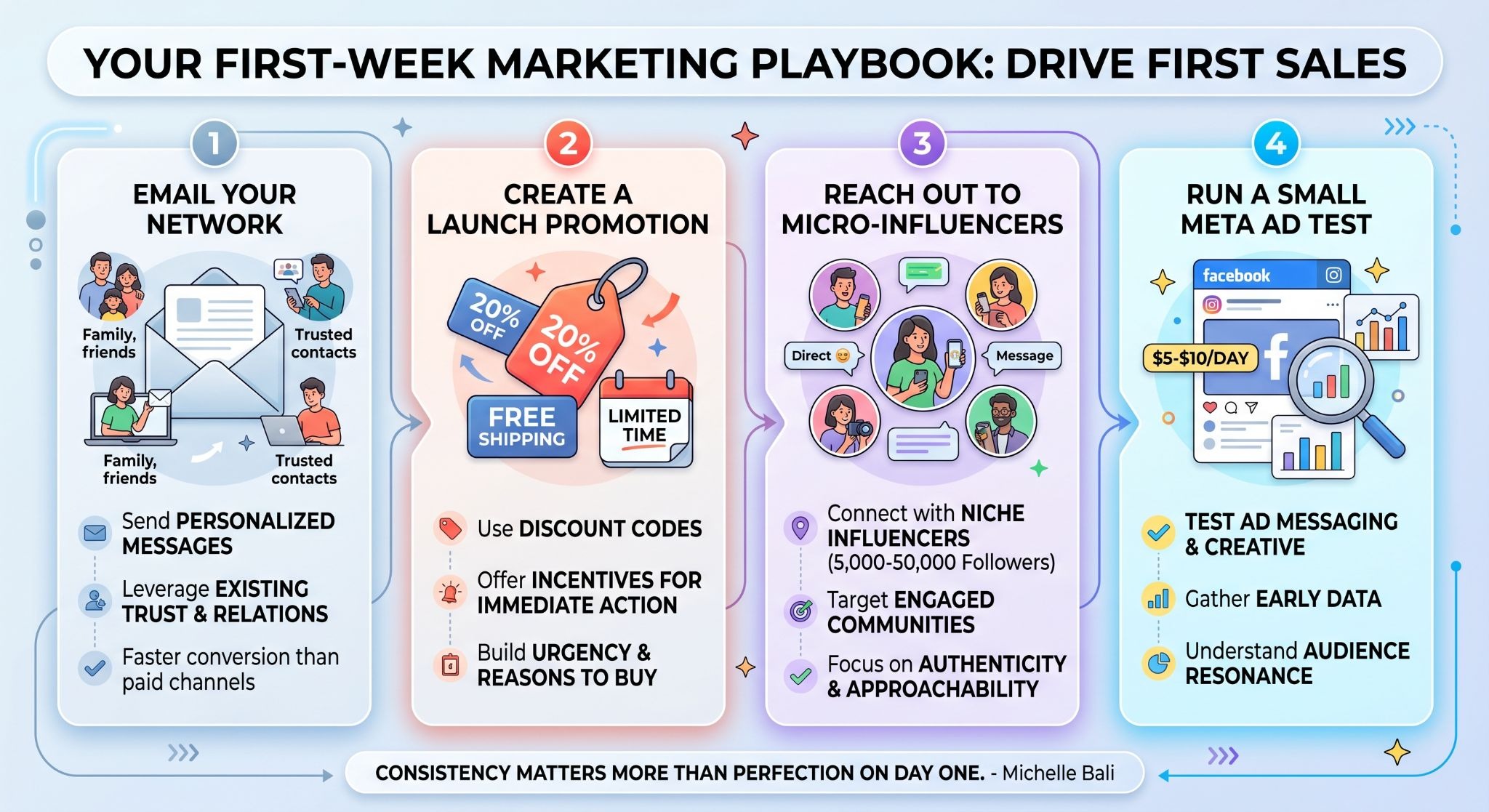

Remove the storefront password under Online Store, then Preferences, and your store is live. Do a final check from an incognito window before you announce it.
For your first visitors: email your network directly, post on personal social media with a link, and create a launch promotion with a limited-time discount or free shipping offer. Reach out to micro-influencers in your niche. Accounts between 5,000 and 50,000 followers often have stronger engagement and are far more approachable for new stores. A small Meta ad test at $5 to $10 per day can give you early data on what messaging lands.
How to Manage Orders After Launch Without the Chaos

Once orders start arriving, you are suddenly juggling inventory, shipments, customer questions, and sales data across disconnected tools. That gets messy fast.
Monday.com is a flexible work platform that helps teams manage projects, sales pipelines, operations, and workflows all in one place. With customizable boards, automations, and integrations, teams can streamline processes, improve collaboration, and get real-time visibility into their work. Whether you are managing customers, tasks, inventory, or internal operations, monday.com adapts to your business without requiring custom software development.
BoostSync for Shopify is the latest and most reliable first-party monday.com app for ecommerce teams. It syncs your order, customer, and inventory data directly into monday.com boards, where your team can track status, assign tasks, and coordinate fulfillment without back-and-forth emails. The setup documentation for BoostSync for Shopify walks through the process step by step. If you also manage accounting workflows, the guide on Xero to Shopify integration for better accounting covers keeping your financial data clean across both platforms.
Your Store Is Live. Now Make It Work Harder

Knowing how to launch a Shopify store is genuinely within reach for anyone willing to follow the steps. From choosing your niche and setting up your account to testing your checkout and driving your first sales, the process is straightforward when you take it one step at a time.
Once you are live, the real work is keeping operations clean at scale. BoostSync for Shopify syncs your orders, inventory, and customer data directly into monday.com so your team always has the full picture without manual updates. Ready to take the next step? Install BoostSync for Shopify on monday.com and start managing your store from a single place. If you want to talk through your setup first, the Boost Plugins team is ready to help.
FAQs About How to Launch a Shopify Store
How long does it take to launch a Shopify store?
The technical setup can realistically be done in a few hours. The strategy, product research, and marketing that make your store successful take longer, and that is completely normal.
Do I need coding skills to launch a Shopify store?
No. Shopify's admin is designed for non-technical users. You can build a fully functional store without writing a single line of code.
What is the cheapest way to start a Shopify store?
Start with the Basic plan at around $39 per month, use a free theme like Dawn, and choose dropshipping or print-on-demand to keep upfront inventory costs at zero.
What should I do in the first week after launch?
Email your network, post on social media, run a launch promotion, and connect your store to monday.com so you have an operations system ready when orders start coming in.
FAQs About Boost Plugins
What does Boost Plugins do?
Boost Plugins builds lightweight data sync apps that connect monday.com to platforms like Shopify, Xero, and QuickBooks Desktop. The apps are designed for non-technical business owners and operations teams who want data to flow automatically without custom dev work.
What is BoostSync for Shopify?
BoostSync for Shopify syncs your Shopify orders, customers, products, inventory, and fulfillment data into monday.com automatically. It is built for eCommerce teams that manage operations from monday.com rather than directly inside Shopify.